
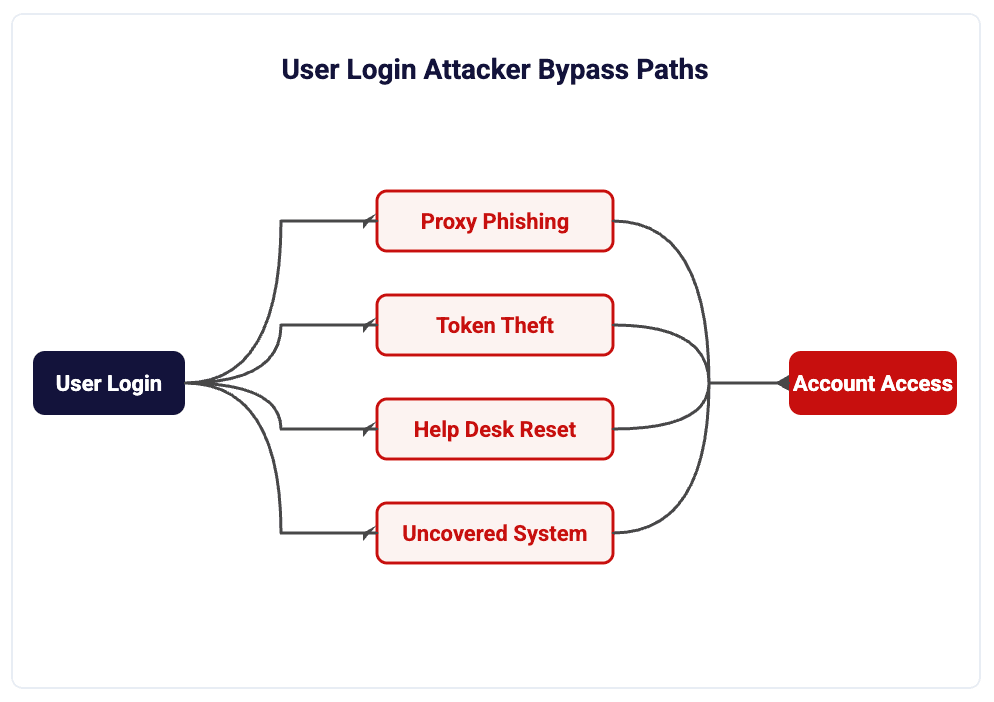
Most of the account takeovers we see start in environments that already had multifactor authentication turned on. MFA is still the highest-value control you can deploy, but the version most small organizations deploy has predictable holes, and attackers have been working those holes for years.
This post is about the specific gaps. Not the theory. The places where MFA is either absent, bypassable, or irrelevant to the attack that actually happens.
Why does MFA fail when it is already turned on?
Three reasons, in order of how often we find them.
Coverage. MFA is enabled for email and nothing else. The VPN, the remote desktop gateway, the backup console, the ERP, the shop floor terminals, and the vendor remote access tool all sit outside it. Attackers do not care which door is hard. They care that one door is easy.
The attack does not need your second factor. If a user enters credentials and an approved MFA code into a proxy site controlled by an attacker, the attacker gets the resulting session token and replays it. The session is already authenticated. MFA did its job and was still bypassed. The same thing happens when infostealer malware lifts browser cookies off a workstation.
The enrollment and recovery path is weaker than the login path. If someone can call your help desk, pass a knowledge check built on public information, and get a factor reset, the strength of the factor itself does not matter. This pattern has been documented repeatedly in advisories from CISA and the FBI on social engineering of IT service desks.
Which authentication paths do small organizations usually miss?
Walk your environment and write down every way a credential can be used. In practice the list is longer than people expect.
- VPN and remote access appliances, especially older SSL VPN concentrators
- Remote desktop, whether direct RDP or through a gateway
- Legacy mail protocols such as IMAP, POP, and SMTP AUTH where still permitted
- Service accounts and shared accounts used by applications, scanners, copiers, and line-of-business software
- Local administrator accounts on servers and workstations
- Hypervisor, backup, firewall, and switch management interfaces
- SaaS admin consoles outside your identity provider, including payroll, banking, and your PSA or accounting platform
- Managed service provider and vendor remote support tools
- OT and production systems in manufacturing, which frequently have shared logins by design
Not every item on that list can take MFA today. That is fine. The point of the inventory is to know which ones cannot, and to put network restrictions, jump hosts, or privileged access workflows around those specifically instead of assuming they are covered. This is precisely what identity control gaps in your NIST 800-171 assessment surface when the scope is mapped correctly.
Are SMS codes and push approvals still good enough?
They are better than nothing and worse than you think.
SMS and voice one-time passcodes are vulnerable to SIM swapping and to interception. NIST has been discouraging their use as a primary out-of-band authenticator for years, going back to the SP 800-63B guidance, and the direction of that guidance has not reversed. If you use SMS, treat it as a fallback and not as your standard for administrators.
Push approval has a different problem. Repeated prompts wear people down, and an attacker with a valid password can send prompts until someone taps approve. Number matching, which requires the user to type a digit displayed on the login screen, materially reduces this and is now default behavior in Microsoft Authenticator. Turn it on everywhere it is available and add the extra context display showing application and location.
Neither SMS nor push is phishing resistant. Both can be relayed through a proxy site in real time. If the attacker controls the middle of the authentication exchange, the strength of the second factor does not matter.
What does phishing-resistant MFA actually mean?
It means the authenticator is cryptographically bound to the site it is authenticating to, so a lookalike domain cannot relay the credential. In practice that means one of the following.
Hardware tokens such as YubiKey that bind the credential to the registered domain. Cannot be relayed to a proxy site.
Device-bound credentials stored in secure hardware on a phone or laptop. Phishing resistant and increasingly native to major platforms.
Certificate or key-based authentication tied to the managed device. Strong fit for organizations already running Microsoft environments.
Smart card or derived credential authentication. Standard in federal environments and the baseline for contractors needing the strongest assurance level.
You do not have to roll this out to everyone on day one. Start with the accounts that end an incident if they are lost: global and tenant administrators, domain admins, the finance approvers who can move money, the backup administrator, and anyone with access to CUI repositories. Enforce phishing-resistant factors for those accounts and require a managed, compliant device for the sessions they create.
Then shorten the blast radius for everyone else. Bind sessions to device compliance where your platform supports it, set reasonable sign-in frequency for high-risk applications, and make sure your team knows how to revoke sessions and not just reset passwords. Resetting a password does not kill a stolen token.
How does this connect to CMMC and DFARS right now?
MFA is an explicit requirement, not a best practice. NIST SP 800-171 requires multifactor authentication for local and network access to privileged accounts and for network access to non-privileged accounts. This carries into CMMC Level 2 as practice IA.L2-3.5.3. An assessor will look for evidence that MFA is enforced across the assessment scope, not that it is available. What a CMMC Level 2 gap assessment actually covers includes identity and access control as one of the most scrutinized control families.
There has been real movement in the program this year. Reporting and commentary from outlets including Federal News Network and Lawfare have covered a Department of Defense pause on third-party verification and the procedural questions that pause raises. We will not characterize the final legal status of that action, because it is being actively litigated in public and is not settled. What is not in dispute is that DFARS 252.204-7012 remains in contracts, and that clause obligates contractors to implement NIST SP 800-171 and to report incidents within 72 hours. A pause in who checks your work is not a pause in the work.
The practical read for a defense contractor is simple. If your MFA coverage has gaps today, those gaps are already a 7012 problem, an insurance problem, and an incident problem, independent of when an assessor shows up.
What should we fix in the next 30 days?
In this order.
- Inventory every authentication path, including the ones that cannot support MFA.
- Close legacy protocol access and confirm there are no per-user exceptions or trusted IP bypasses left over from a project three years ago.
- Enforce phishing-resistant factors on administrators and finance approvers.
- Turn on number matching and additional context for every push-based factor.
- Write a help desk verification procedure for factor resets that does not rely on information an attacker can find, and require callback to a known number or manager confirmation.
- Document your session revocation process and test it.
- Log and alert on new factor enrollment, factor deletion, and impossible-travel sign-ins.
None of these require a new platform. Most of them are configuration and process changes in tools you already pay for.
Frequently asked questions
Does MFA stop phishing?
Not by itself. Standard MFA stops password reuse and credential stuffing, but adversary-in-the-middle phishing kits relay the login and the code in real time and capture the resulting session token. Only phishing-resistant factors such as FIDO2 keys, passkeys, or certificate-based authentication are bound to the legitimate domain and cannot be relayed.
Is SMS-based MFA compliant with NIST 800-171 and CMMC?
SMS can satisfy the requirement for a second factor, but NIST guidance has discouraged SMS as an out-of-band authenticator due to SIM swap and interception risk. Treat it as a fallback rather than a standard, and use an authenticator app or hardware key for privileged accounts.
What is MFA fatigue and how do we stop it?
MFA fatigue, also called push bombing, is an attacker with a valid password sending repeated approval prompts until the user taps approve out of annoyance or confusion. Number matching, which forces the user to enter a code shown on the sign-in screen, largely defeats it. Pair that with alerting on repeated denied prompts.
If an attacker steals a session token, does changing the password help?
No. A stolen session token remains valid until the session is explicitly revoked or expires, regardless of a password change. Your response procedure must include revoking active sessions and, where supported, invalidating refresh tokens for the affected account.
Do we still need MFA work if CMMC assessments are paused?
Yes. DFARS 252.204-7012 remains in contracts and requires implementation of NIST SP 800-171, including the multifactor authentication requirement, along with 72-hour incident reporting. The status of third-party verification has been in flux, but the underlying contractual obligation has not changed.
What about accounts and systems that cannot support MFA?
Document them, restrict them by network path, place them behind a jump host or privileged access workstation, rotate their credentials on a schedule, and monitor their use closely. An exception you have inventoried and compensated for is defensible. One you did not know about is not.
Sources
- NIST SP 800-171 Revision 2, requirement 3.5.3, multifactor authentication. csrc.nist.gov
- NIST SP 800-63B, Digital Identity Guidelines, authenticator guidance on out-of-band SMS. pages.nist.gov
- DFARS 252.204-7012, Safeguarding Covered Defense Information and Cyber Incident Reporting. acquisition.gov
- CMMC Level 2 practice IA.L2-3.5.3, DoD CMMC Assessment Guide. dodcio.defense.gov
- Microsoft documentation on number matching and additional context in Microsoft Authenticator. learn.microsoft.com